

Here is the whole process in seven steps:
1. Audit your bottlenecks. Count missed calls, lead response times, appointment show rates and hours spent on manual work.
2. Fix your data. Clean up the CRM, connect your lead sources, DMS and inventory feed, and decide who owns the data.
3. Pick one pilot. Lead response or phone answering pays back fastest at most stores.
4. Automate department by department: sales and BDC, then marketing, inventory, service and the back office.
5. Keep humans in the loop. Set clear handoff rules so an AI agent passes hot buyers and upset customers to a person.
6. Measure and scale. Track response time, appointments, show rate, closing rate and cost per sale, then add the next department.
This guide is for dealer principals, general managers, BDC and internet managers, and service and fixed ops directors at franchise and independent stores. Each department section explains what to automate, how it works day to day, which numbers to watch and where people should stay in control.
What does it mean to automate a car dealership with AI?
Automating a car dealership with AI means using software that can understand customers and data to do routine work on its own. That includes answering leads, booking appointments, following up, writing listings, sorting invoices and flagging problems. The software works around the clock, and your staff step in when judgment or a personal touch is needed. Done well, it shortens response times and lets the same team handle more customers.
Automation vs AI vs AI agents: what’s the difference?
These three terms get mixed up a lot, and vendors don’t always use them honestly. Here’s the plain version.
| Rule-based automation | AI (machine learning and language models) | AI agents | |
|---|---|---|---|
| What it does | Follows fixed “if this, then that” rules | Understands language, spots patterns, predicts outcomes | Takes actions toward a goal across several steps and systems |
| Dealership example | Send a service reminder at 5,000 miles | Read a lead’s message and write a personal reply about the exact car | Reply to a lead, answer trade-in questions, book a test drive, update the CRM and remind the customer the day before |
| Handles surprises? | No | Partly | Yes, within limits you set |
| Needs a human for | Writing and updating every rule | Checking quality and edge cases | Approving key actions and taking escalations |
Reynolds and Reynolds puts the difference simply:
Automation is about execution. AI is about adapting and growing with your dealership.
A quick test for any tool marketed as AI:
- Can it handle a question it was never scripted for?
- Does it learn from new data?
- Can it act without someone rewriting rules?
If the answer to all three is no, it’s automation with an AI label. That can still be useful, but price it that way.
Which dealership tasks AI handles well, and which it doesn’t
AI is strong at work that is high-volume, repetitive and time-sensitive
- Answering the same 50 questions about price, availability, hours, trade-ins and financing basics
- Replying to every lead in seconds, at 2 a.m. or on a holiday weekend
- Following up for weeks without getting bored or forgetting
- Writing first drafts of listings, emails, review replies and repair order notes
- Reading invoices, documents and call recordings faster than a person
AI is weak at work that needs judgment, trust or accountability
- Negotiating a deal or working through a payment objection face to face
- Calming an angry customer with a real problem
- Final legal and finance disclosures
- Anything where a wrong answer is costly and nobody checks it
The best setups split the work: AI does the first 80% of the routine, and a person owns the moments that win or lose the customer.
Why dealerships are automating with AI in 2026
Dealerships are automating because shoppers now expect instant answers at any hour, and most stores can’t staff for that. Meanwhile, AI tools have become cheap and good enough to handle routine conversations. The gap is results: most dealers have tried AI, but few have changed how they work.
Car shoppers now research with AI
According to Cox Automotive’s AI in Auto Retail Tracker (Q2 2026), 63% of car shoppers plan to use AI tools for their next purchase. AI chat tools (36%) are now almost as popular a research channel as automotive shopping sites (38%). A shopper who gets answers from ChatGPT at 11 p.m. expects the same speed from your dealership.
The adoption gap: 82% of dealers use AI, but only 22% see growth
The same Cox Automotive tracker found that 82% of dealers use AI in some form. Yet only 22% of those dealers say it has grown their sales or revenue, and about a third aren’t measuring its impact at all. Dealers who worked with an outside AI partner did better: 36% reported growth, compared with 21% of those who didn’t.
82%
of dealers use AI in some form
22%
of them say it has grown sales or revenue
36% vs 21%
reporting growth with vs without an outside AI partner
Buying an AI tool isn’t the hard part. The dealers who see results are the ones who change the process around it and measure what happens.
Where dealerships leak revenue today
Most of the money AI can recover is already walking out the door:
- Slow lead response. Research published in Harvard Business Review found that companies that tried to contact online leads within an hour were nearly seven times as likely to qualify them as those that waited even one hour longer. Many dealerships still take hours.
- Missed and abandoned calls. Calls that come in at lunch, after hours or while staff are busy often go unanswered, and a missed call usually goes to the next dealer.
- Follow-up that stops too soon. Salespeople tend to give up after one or two tries, while many buyers need more touches before they’re ready.
- No-shows. Appointments booked without confirmation and reminders often don’t show up.
- Fixed ops capacity. NADA Data shows U.S. franchised dealers sold more than $164 billion in service and parts and wrote over 276 million repair orders in 2025. Every unanswered service call or unbooked declined repair is lost gross profit.
- Manual back-office work. Typing invoices, chasing paperwork and rebuilding reports by hand eat hours that could go to customers.
The dealership AI automation map
The table below shows what to automate first in each department, which kind of AI does the job, and the number that tells you it’s working. “Effort” and “time to results” are typical ranges for a store with a working CRM and DMS. They’ll vary with your data and vendor.
| Department | Automate first | Type of AI | Main KPI | Effort | Typical time to results |
|---|---|---|---|---|---|
| Sales | Instant lead replies, qualification, appointment booking, long-term follow-up | AI sales agent (text, email, chat) | Lead response time, appointments set | Low | 2–4 weeks |
| BDC and phones | Answering every sales, service and parts call 24/7, outbound confirmations | AI voice agent | Calls answered, appointment show rate | Low–medium | 2–4 weeks |
| Website and chat | Inventory-aware chat, trade-in and availability questions | Conversational AI [Chat Widget] | Chat-to-lead rate | Low | 1–2 weeks |
| Marketing | Inventory ads, audience targeting, email and SMS campaigns | Predictive AI + generative AI | Cost per lead, cost per sale | Medium | 4–8 weeks |
| Reputation | Review requests to happy customers | AI Sales Agent | Review volume, average rating | Low | 2–4 weeks |
| Inventory merchandising | Photos, 360 spins, video tours, listing sync | AI-powered photography software | Time to online, VDP views, CTR | Low–medium | 2–4 weeks |
| Acquisition and pricing | Trade-in valuations, private-seller sourcing, pricing alerts | Predictive AI + AI agents [AI Buy Agent] | Units acquired, days to turn | Medium | 4–8 weeks |
| Service department | Scheduling, reminders, recall outreach, status updates | AI voice and text agents | ROs per day, show rate | Low–medium | 2–6 weeks |
| Service lane | Video inspections, RO notes, declined-service follow-up | Generative AI + speech-to-text | Hours per RO, declined work recovered | Medium | 4–8 weeks |
| Accounting and back office | Invoice capture, document matching, reporting | Document AI | Minutes per invoice, days to close the month | Medium–high | 1–3 months |
| HR and training | Call scoring, coaching, onboarding | Speech analytics + generative AI | Call quality score, ramp-up time | Low–medium | 4–8 weeks |
| AI search visibility | Accurate inventory, reviews and business data AI assistants can read | Content and data work | Mentions in AI answers, leads from AI | Medium | 2–4 months |
If you can only do one thing this quarter, make sure every lead and every phone call gets a fast, useful answer. It’s the cheapest fix with the quickest payback in almost every store.
Before you automate: 5 foundations to put in place
AI can only be as good as the data and process you give it. Putting these five foundations in place first is what separates stores that see results from stores that just pay another software bill.
1. Clean up and connect your CRM and DMS data
AI agents read and write to your CRM, DMS and inventory feed. If the data is messy, the AI will be too. Before launch:
- Merge duplicate customer records and fix bad phone numbers and emails.
- Make sure every lead source (your website, marketplaces, social, phone) lands in the CRM with its source tagged.
- Confirm the inventory feed updates at least daily, with correct prices, photos and status (in stock, in transit, sold).
- Ask each vendor exactly which systems they connect to and whether the connection reads data, writes data, or both.
2. Map your processes before you buy software
Write down how a lead, a phone call and a service appointment move through your store today. Note who touches each one, how long each step takes and where things fall through the cracks. Automating a broken process just makes it break faster.
3. Assign an AI owner and simple rules
Pick one manager who owns AI results, often the BDC, internet or operations manager. Give them a one-page policy that covers:
- What the AI may say and do: quote prices, book appointments, discuss financing basics
- What it must hand to a person: complaints, legal questions, negotiation, credit decisions
- How customer data is protected and who can see it
- How often someone reviews conversations for accuracy
For a deeper framework, the free NIST AI Risk Management Framework is a useful reference.
4. Capture baseline KPIs
You can’t prove ROI without a “before” number. Track these for at least two to four weeks before you go live:
- Average and median first response time to internet leads
- Percentage of calls answered, by department and by hour
- Appointments set, shown and sold
- Service ROs per day and declined-service recapture
- Hours spent on manual tasks such as data entry, invoice processing and report building
5. Get your team on board
Staff often worry that AI will replace them. Be clear about the goal: AI takes the repetitive work, so salespeople and advisors spend more time with buyers who are ready to act. Involve your best people in testing, show them the time it saves, and adjust pay plans if appointment credit moves to the AI.
How to automate car sales and lead follow-up with AI
To automate car sales with AI, connect an AI sales agent to your CRM and lead sources. It replies to every new lead within seconds, answers questions about the exact vehicle, qualifies the buyer, books a test drive and keeps following up until the customer buys or opts out. Salespeople get the appointment along with a summary of the conversation.
Answer every internet lead in under 60 seconds
Leads arrive from your website, third-party marketplaces, social ads and OEM programs, usually in a standard format called ADF/XML. An AI sales agent picks each one up the moment it lands in the CRM and replies by text, email or chat, whichever the shopper used. The reply is about the specific vehicle: whether it’s available, the price, its features and a few test-drive times. It isn’t a generic “thanks for your interest” template.

Qualify buyers and book appointments automatically
A good AI agent asks the questions a strong BDC rep would ask, one at a time and in natural language:
- Is this the vehicle you want, or are you open to similar ones?
- Do you have a trade-in? What year, make, model and mileage?
- Are you planning to pay cash, finance or lease?
- When would you like to come in?
It then books the appointment in your calendar or CRM, sends a confirmation and a reminder, and flags the lead as hot, warm or nurture.
Run follow-up that doesn’t stop after two tries
Most buyers aren’t ready the day they submit a lead. AI can keep a personal, helpful follow-up going for weeks, spaced out over time and adjusted to how the customer responds. Price drops, new arrivals that match what they want and trade-in value updates give it a reason to reach out.
Reactivate your dormant CRM database
Your CRM holds thousands of past leads and customers who never bought, or who bought years ago. AI can work through that list in a way a busy BDC never will: equity alerts, lease-end reminders and “we just got the model you asked about” messages. Equity and lease-end messages are marketing. Use AI-voice calls only with prior express written consent, and check do-not-call lists first (see the compliance section below).
Give salespeople AI-prepared deal summaries
When a customer arrives, the salesperson should already know what they’ve asked, which vehicles they’ve looked at, their trade-in and their budget. AI can write that summary from the conversation history, so nobody asks the customer to repeat themselves.
Drivee’s Conversational AI Sales Agent handles this whole flow across text, email, web chat and social messages, and connects to more than 60 dealership systems through Drivee’s integrations.
How to automate your BDC and dealership phone calls with AI voice agents
An AI voice agent answers your dealership’s phone calls in a natural voice, any time of day. It understands what the caller wants, answers common questions, books sales and service appointments, and transfers the call to the right person when needed. It also makes outbound calls, such as appointment confirmations and lead callbacks, to people who have agreed to be contacted.
.webp)
Inbound: answer sales, service and parts calls 24/7
Phone calls are still where many of your most serious buyers and service customers reach you. A voice agent can:
- Answer on the first ring, even when five calls come in at once
- Check whether a specific vehicle is in stock and share its price and key features
- Book, move or cancel service appointments
- Take parts questions and pass quote requests to the parts counter
- Route calls to the right person, with a short summary so the customer doesn’t have to repeat themselves
- Give hours, directions and loaner availability
- Write every call into the CRM with a transcript and the next step
Outbound: confirmations, no-show recovery and lead callbacks
Outbound AI calls can confirm tomorrow’s appointments, reschedule no-shows, call back web leads whose form included clear consent to be called and remind service customers about due maintenance. Under U.S. law, AI-voice calls need the customer’s prior express consent. Read the compliance section before you switch on any outbound calling.
AI BDC vs in-house BDC vs outsourced call center
| AI voice and text agents | In-house BDC | Outsourced call center | |
|---|---|---|---|
| Hours covered | 24/7, including holidays | Store hours, depends on staffing | Often extended hours |
| Calls handled at once | Many at the same time | One per rep | One per agent |
| Speed to answer | Seconds | Varies with staffing and breaks | Varies by contract |
| Knowledge of your inventory | Live, if connected to your feed | Strong | Often limited |
| Consistency | Same process on every call | Varies by rep | Varies by agent |
| Cost structure | Software subscription or usage fee | Salaries, benefits, turnover, training | Per call, per minute or per appointment |
| Best at | Volume, speed, after-hours, routine questions | Relationships, complex deals | Overflow coverage |
Most stores get the best results from a hybrid. AI takes every call and lead first, handles routine requests and books appointments. Your BDC team then focuses on high-intent conversations and anything the AI escalates.
Drivee’s AI Voice Agent answers inbound and outbound calls in many languages, and staff can listen in or take over at any time.
How to automate your dealership website and chat
AI chat on your website answers shoppers’ questions instantly, using your live inventory, hours and policies. It turns anonymous visitors into named leads with appointments. Unlike old scripted chat widgets, it understands open questions like “Do you have a hybrid SUV under $35k with third-row seating?”
AI chat that knows your live inventory
Connect the chat to your inventory feed so it can search by price, body style, features and mileage, link straight to the vehicle detail page (VDP), and suggest close matches when the exact car is sold. Make sure it hands off smoothly to text or phone so the conversation follows the shopper when they leave the site.
Trade-in, payment and availability questions around the clock
The questions shoppers ask most can all be answered or started by AI at any hour: “Is it still available?”, “What’s my trade worth?”, “What would my payment be?” and “Can I test drive it tomorrow?” Have the AI give estimates only, label them clearly, and leave exact payments and credit decisions to your finance team.
Your website itself matters as much as the chat. Fast pages, accurate inventory and clear VDPs make every AI tool on top of them work better. Drivee builds SEO-optimized dealership websites designed around live inventory.
How to automate dealership marketing and advertising with AI
AI automates dealership marketing in three ways. It keeps your inventory ads and listings in sync with what’s on the lot. It predicts which shoppers and past customers are most likely to buy. And it writes and sends personal email, SMS and social content at scale. Your marketing manager sets the strategy and budget, and the AI does the daily work.
Push inventory ads to marketplaces and social automatically
Every time a vehicle arrives, sells or changes price, your listings and ads should update everywhere: your website, third-party marketplaces, social catalogs and search ads. Doing that by hand means stale ads for sold cars and missing ads for new arrivals. Automation turns listings on and off and updates prices without anyone touching them. AI can also post each new vehicle for you automatically, writing a detailed, human-sounding description from its specs and photos. It can even answer buyer messages that come in through your ad platforms, around the clock, so no lead goes cold waiting for a reply. On top of that, AI can move budget toward the vehicles that need it most, like aged units or high-gross trucks.
Drivee’s Automated Advertising posts and updates your inventory across marketplaces automatically; and responds to Messenger leads, and sends qualified leads directly to your CRM.
Target likely buyers with predictive audiences and vehicle-specific ads
Predictive AI looks at your CRM and DMS history to find people who are likely in the market. These include customers with positive equity, leases ending soon, high-mileage vehicles or repeated service visits on an aging car. It then shows them ads or messages about the specific vehicles that fit them, instead of a generic “Sales event this weekend!” blast.
Write email, SMS and social content with AI
Generative AI can draft monthly newsletters, model-specific comparison posts, event invitations and short video scripts in your store’s voice. Keep a person reviewing anything that mentions prices, rebates or financing offers. Advertising rules for those terms are strict, and AI can get the fine print wrong.
How to automate reputation and review management
AI automates reputation management by asking every happy sales and service customer for a review at the right moment. It also drafts a personal reply to every review, good or bad, for a manager to approve. More genuine reviews can raise your rating and visibility in local search and AI answers, and prompt replies show shoppers you care.
Send review requests automatically after sales and service
Trigger a short text or email when a vehicle is delivered or a repair order closes, with a direct link to your Google Business Profile or another review site. Timing matters: customers are most likely to respond while the visit is fresh, so send it the same day.
Use AI to draft review replies, with human approval
AI can write a reply to every review in seconds. It thanks the customer by name, mentions their salesperson or advisor, and invites unhappy customers to call a specific manager. Have a person approve replies to negative reviews, and never let AI promise refunds or admit fault.
Never use AI to write reviews
- The FTC’s rule banning fake reviews and testimonials (announced August 2024) covers AI-generated reviews. It also bans insider reviews without disclosure and paying for reviews that express a particular sentiment.
How to automate inventory merchandising: photos, 360 spins, video and listings
AI gets a vehicle online faster and makes its listing more convincing. A lot attendant can shoot studio-quality photos and a 360-degree spin with a phone. AI then cleans up the backgrounds, writes the description, creates a video walkaround with voiceover and pushes the listing to every site. Cars that go online sooner and look better tend to get more views and sell faster.

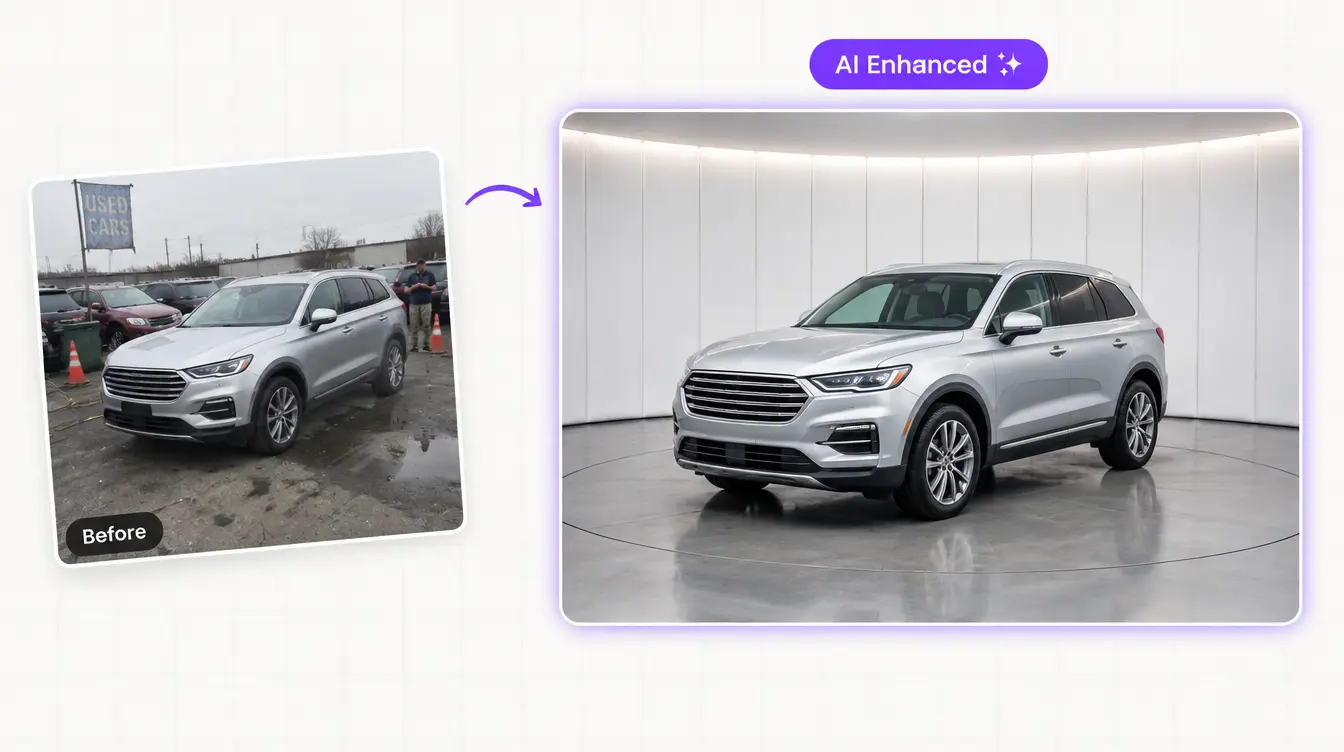
Shoot AI-enhanced photos and 360 spins on the lot
You don’t need a photo booth. AI photo tools guide the attendant through the shots, then fix lighting, swap in a clean branded background and keep every listing looking consistent. An interactive 360 spin lets online shoppers “walk around” the car before they visit.
Create AI video walkarounds with scripts and voiceover
AI can turn a vehicle’s photos and specs into a short video tour. It writes the script from the VIN-decoded features and adds a voiceover. These videos work on the VDP, in marketplace listings, on social media and in follow-up texts to leads.
Write descriptions with AI and keep every listing in sync
AI writes an accurate, readable description from the VIN data and options list, so you don’t have to rely on a generic template. Have it highlight what buyers in your market search for, like “third row,” “AWD” or “one owner.” Automation then keeps price, photos and status identical across your website and every marketplace.
The same logic applies before a car is ready to photograph. Reconditioning (“get-ready”) tools track each used vehicle through inspection, repairs, detail and photos. They alert managers when a car gets stuck. Every day a car waits in recon is a day it can’t be seen online, so cutting that time pays off directly in holding costs.
Drivee offers 360° car photography and AI video tours in one platform.
How to automate used-car acquisition, appraisal and pricing
AI helps you buy the right used cars at the right price and price them to turn. It gives shoppers instant trade-in estimates, finds private sellers who want to sell, and watches market prices and days on lot so you know when to adjust. Your used-car manager still makes the final call on every appraisal and price.
Give instant AI trade-in estimates
A trade-in tool on your website, in chat or by text asks for the year, make, model, trim, mileage and condition, plus photos when possible. It returns a value range in seconds. That keeps the shopper engaged and gives your appraiser a head start. Always present it as an estimate that depends on an in-person inspection.
Source private-seller vehicles with AI
Auction prices and competition for clean used cars push more dealers to buy directly from consumers. An AI buying agent can reach out to people listing cars privately or to your own service customers with sought-after vehicles. It asks qualifying questions, collects photos and VINs, and books an appraisal. It should contact private sellers only through channels where they’ve agreed to be contacted, and never with AI-voice calls without the right consent.
Use market-based pricing and aged-inventory alerts
Pricing tools compare each unit to similar vehicles in your market, then suggest a price and flag cars that are drifting toward aged inventory. AI adds forecasting: which units are likely to sit, which will sell fast, and which to wholesale before they cost you more.
Drivee’s AI Buy Agent values trades and sources inventory from private sellers. Book a demo to see it on your market.
How to automate the service department with AI
AI automates the service department by booking appointments by phone, text and web around the clock. It also sends maintenance and recall reminders, follows up on declined work and keeps customers updated while their car is in the shop. Advisors spend less time on the phone and more time with customers in the drive. Dealers are catching on: Cox Automotive’s tracker shows AI use in service and fixed ops rose from 33% to 39% in one quarter of 2026.
.webp)
Book service appointments by phone and online with AI
Service calls often outnumber sales calls, and many come in when advisors are busy with customers. An AI voice or text agent can book, move and cancel appointments. It can check available times, ask about the concern, note whether the customer needs a loaner or shuttle, and confirm the visit. It writes everything straight into your scheduling system, so nobody re-types it.
Automate maintenance reminders, recall outreach and declined-service follow-up
These three messages bring in work you’ve already earned:
- Maintenance reminders based on mileage, time since last visit and the manufacturer’s schedule.
- Recall outreach to owners of affected vehicles, with a link to book. Customers can also check any VIN on the NHTSA recall lookup.
- Declined-service follow-up. A customer who declined brakes or tires last month gets a friendly reminder, with the inspection photo or video, and an easy way to book.
Send automatic status updates and pickup notifications
The “Is my car ready yet?” call is one of the most common calls a service department gets. Automated texts at check-in, when work is approved, when parts arrive and when the car is ready cut down those calls. Add a text-to-pay link, if your system supports it, and pickup goes faster too.
How to use AI in the service lane and with technicians
In the service lane, AI saves time on paperwork and helps customers say yes to needed repairs. It turns a technician’s spoken notes and inspection videos into clear repair order (RO) notes and easy-to-read customer explanations. It can also help technicians find repair information faster. The technician still diagnoses the car and the advisor still sells the work.
Turn video inspections into AI-written RO notes
Many stores already send customers a short video of the multipoint inspection (MPI). AI adds two things on top:
- Speech-to-text RO notes. The technician talks through the “3 Cs” (complaint, cause and correction) while working, and AI writes clean, complete notes. That reduces back-and-forth with advisors and missing details on warranty and customer-pay lines.
- Plain-language customer summaries. AI rewrites “front pads at 3 mm, rotors below discard spec” as a short, honest explanation the customer understands, with the video attached.
Use AI assistants for repair information and documentation
AI assistants can search service manuals, technical service bulletins and your store’s past repair history to suggest where to look first on a tough diagnosis. They can also pre-fill documentation from the technician’s notes. Treat their suggestions as a starting point. The technician confirms every diagnosis, and every warranty claim follows the manufacturer’s rules and gets a human review before it’s submitted.
How to automate dealership accounting and back office
In the back office, AI’s main job is reading documents and moving data. It captures invoices and matches them to purchase orders and DMS records. It flags anything that doesn’t match and builds routine reports. Your accounting staff review and approve. AI doesn’t replace your controller, your CPA or your internal controls.
Capture and process AP invoices with AI
Accounts payable is a common starting point. Instead of typing each parts, sublet and vendor invoice into the DMS, document AI reads the invoice and fills in the fields. It routes the invoice for approval and posts it once approved. Baker Tilly notes that dealerships using AI platforms report invoice entry falling from 10–12 minutes per invoice to as little as 15 seconds. Results vary with your invoice mix and how well the tool connects to your DMS.
Track contracts in transit and flag exceptions
AI can watch deal funding status, list missing signatures or stipulations, and alert the right person before a contract ages. In reconciliations, it can match routine items and set aside the exceptions for an accountant to investigate. The rule is simple: AI prepares, people approve.
Automate routine management reports
Daily operating reports, sales and gross recaps and service KPIs can be built automatically from DMS and CRM data and sent to managers each morning. Some tools also let managers ask questions in plain English, like “What was used-car gross per unit last month by salesperson?”
How to use AI for HR, training and call quality
AI helps dealerships train people faster and coach them better. It scores sales and service calls against your process, points out missed steps and suggests specific coaching for each person. It also takes repetitive work out of hiring and onboarding. Managers spend their coaching time where it matters most instead of listening to random calls.
Score and coach sales and BDC calls with AI
Speech analytics transcribes calls and checks them against your playbook. Did the rep ask for the appointment? Did they get a phone number? Did they mention the trade-in? Each rep gets a scorecard, and managers get a short list of calls worth reviewing together. The same review works for AI agents, so you can check what your voice and text agents are telling customers.
Some states require every party’s consent to record a call. Use a clear “this call may be recorded” message and confirm your setup with counsel.
How to get your dealership recommended in ChatGPT and Google AI answers
To get recommended by AI assistants, give them accurate, consistent, easy-to-read information about your dealership. That means your inventory, prices, hours, location, reviews and what makes you different. AI tools build answers from your website, your Google Business Profile, review sites, marketplaces and articles that mention you. If that information is thin or contradictory, they’ll recommend someone else.

How shoppers use AI to pick a car and a dealer
Shoppers now ask questions like “Which dealers near me have a 2025 hybrid SUV under $35,000?” or “Is this dealership trustworthy?” Cox Automotive’s tracker found that only 29% of dealers are actively adjusting for AI-powered search, so the stores that act now have an open lane.
Make your inventory, reviews and business data readable to AI
Work through this checklist:
1. Keep your Google Business Profile complete and current: hours for sales, service and parts, departments, photos and answers to common questions.
2. Publish clean, fast VDPs with the price, key features, VIN, mileage and real photos as text and images, not just inside a PDF or image.
3. Add structured data for your business. Use AutoDealer markup from schema.org and follow Google’s local business structured data guidelines. Google phased out vehicle listing rich results in 2025. Focus on business-level markup and accurate inventory feeds instead.
4. Earn steady, recent reviews on Google and the major automotive review sites, and reply to them.
5. Answer real questions on your site: financing basics, trade-in process, service pricing and what makes your store different. Write them as clear question-and-answer pages.
6. Keep your name, address, phone number and hours identical everywhere your dealership is listed.
7. Test it. Each month, ask ChatGPT, Gemini, Perplexity and Google’s AI Mode the questions your customers ask, and note whether your store shows up.
For the bigger picture of how AI is changing car buying, see our guide to the role of AI in the automotive industry.
AI compliance for car dealerships: TCPA, FTC Safeguards and disclosure
Three sets of rules matter most when U.S. dealerships use AI. Telemarketing law decides when AI can call or text customers. The FTC Safeguards Rule decides how customer data must be protected. Bot-disclosure rules decide when you must say a customer is talking to AI. This section is general information, not legal advice.
Get consent before AI calls and texts
On February 8, 2024, the FCC ruled that AI-generated voices count as “artificial” voices under the Telephone Consumer Protection Act (TCPA) (FCC ruling). In practice:
- Outbound calls that use an AI voice need the customer’s prior express consent. Marketing calls need prior express written consent.
- The FCC treats text messages as calls under the TCPA, so the same consent and do-not-call rules apply to marketing texts.
- Respect the National Do Not Call Registry, your own internal do-not-call list and every opt-out (“STOP”) right away.
- Make telemarketing calls only between 8 a.m. and 9 p.m. in the customer’s local time. Some states have stricter rules.
- AI answering an inbound call from a customer who called you is a different situation from AI dialing out.
Protect customer data under the FTC Safeguards Rule
Dealerships that finance or help arrange financing, or lease vehicles for more than 90 days, are “financial institutions” under the FTC Safeguards Rule. The rule requires a written information security program that includes:
- A qualified individual in charge of the program
- A written risk assessment
- Access controls, encryption and multi-factor authentication
- Monitoring and testing of your systems
- A written incident response plan
- Oversight of service providers
- A written report to your board or owner at least once a year
Dealers that keep information on fewer than 5,000 consumers are exempt from a few of these, including the written risk assessment, the incident response plan and the annual report.
The FTC’s own Safeguards Rule FAQs for auto dealers (2025) confirm that dealers who finance or help arrange financing are covered, as are dealers who lease vehicles for more than 90 days.
Service provider oversight is the part that matters most for AI. Any AI vendor that can see customer information is a service provider you must vet and monitor. Since May 13, 2024, if unencrypted information about 500 or more consumers is acquired without authorization, you must notify the FTC as soon as possible and no later than 30 days after discovery.
Ask every AI vendor:
- Where is our customer data stored, and is it encrypted?
- Is our data used to train models for other companies?
- Who at your company can access it, and do you use multi-factor authentication?
- What happens to our data if we cancel?
- Will you sign a contract that spells out these protections?
Tell customers when they’re talking to AI, and keep a person available
California’s bot disclosure law (SB 1001) makes it unlawful to use an undisclosed bot to mislead people online in order to encourage a sale. Other states are adding AI rules too. The simplest policy works everywhere: have the AI introduce itself as a virtual assistant, and offer a human whenever the customer asks.
Keep AI answers accurate
Your dealership is responsible for what its AI tells customers. Connect the AI to live inventory and approved pricing. Block it from inventing rebates, rates or payment quotes. Review a sample of conversations every week.
What your dealership should not automate
Don’t fully automate anything where a mistake is expensive, the law requires a person, or trust is on the line. Use AI to prepare for these moments, but leave them to people:
Leave these to people
- Negotiation and desking. AI can share listed prices and estimates. Final numbers, trade-in offers and deal structure belong to your managers.
- Credit decisions and final F&I disclosures. Financing terms, product presentations and signed paperwork need trained, accountable people.
- Upset customers and complaints. Hand these to a manager quickly, with the full conversation history attached.
- Diagnosis and safety calls in service. AI can suggest where to look. A technician decides what’s wrong and what’s safe.
- Anything legal. Lemon-law questions, accident claims, disputes and threats go straight to the right person.
- Final say on pricing and appraisals. AI recommends, managers decide.
AI should make your people faster, not invisible. Customers forgive a bot that quickly gets them to a helpful person. They don’t forgive one that traps them in a loop.
A 90-day roadmap to automate your dealership with AI
You can go from no AI to a measurable, working setup in about 90 days. Start with one pilot, prove it with numbers, then add departments one at a time. This plan assumes a single store with a working CRM and DMS. Dealer groups can run it at one pilot store, then roll it out to the others.
Days 1–30: audit, baseline and one pilot
1. Measure your starting point. Pull 30 days of lead response times, missed calls by hour and department, appointment show rates and close rates.
2. Pick the pilot. Choose lead response or phone answering, whichever is leaking more.
3. Choose a vendor using the questions in the vendor section below, and confirm the CRM and DMS connections in writing.
4. Set the rules: what the AI can say, which offers and prices it can quote, when it must hand off, and how consent is captured.
5. Train the AI on your store: inventory feed, hours, departments, staff names, FAQs and tone of voice.
6. Go live in a soft launch. Start with after-hours leads or overflow calls, and review conversations every day.
Days 31–60: expand to follow-up, service and merchandising
1. Turn the pilot on fully for all hours and lead sources once accuracy is consistently good.
2. Add long-term follow-up and database reactivation for leads that didn’t book.
3. Add service scheduling and reminders by phone and text.
4. Speed up merchandising: AI photos, 360 spins, video and automatic listing updates.
5. Hold a weekly 30-minute review with sales, BDC and service managers to check numbers, sample conversations and fix handoff gaps.
Days 61–90: measure, tune, then add the next layer
1. Compare against your baseline on response time, calls answered, appointments, show rate, sales and ROs.
2. Tune the scripts and handoff rules based on what customers actually ask.
3. Add the next layer: reputation automation, marketing campaigns, the service lane or back-office invoice capture.
4. Write down what worked as a short playbook for new hires and other stores.
5. Set quarterly goals for each department and review them like any other KPI.
A good 90-day result isn’t “we installed AI.” It’s “we now answer every lead in under a minute, book more appointments and spend fewer hours on manual work, and here are the numbers.”
How to measure the ROI of dealership AI
Measure dealership AI by comparing the same KPIs before and after launch. Turn the difference into gross profit and hours saved, subtract what the AI costs, then divide by that cost. Only measure what the AI actually touches, and give it at least 30–60 days so you’re not reading noise.
| Department | KPI | How to measure it |
|---|---|---|
| Sales and BDC | First response time | Median minutes from lead arrival to first real reply |
| Sales and BDC | Appointments set and shown | Appointments per 100 leads, and the share that show up |
| Sales and BDC | Sales from AI-handled leads | Sold units where AI made first contact or booked the appointment |
| Phones | Calls answered | Answered calls divided by total calls, by hour and department |
| Marketing | Cost per sale | Ad spend divided by sold units attributed to the campaign |
| Inventory | Days to online | Days from acquisition to live listing with full photos |
| Service | Appointments booked by AI, ROs per day | Scheduler and DMS reports |
| Service | Declined-service recapture | Declined repairs later booked and completed |
| Back office | Minutes per invoice | Time study before and after |
| All | Staff hours saved | Hours of manual tasks removed; times loaded hourly cost |
Illustrative example (your numbers will differ): suppose AI follow-up books 20 more sales appointments a month. At a 60% show rate that’s 12 extra visits. If 35% of those buy, that’s about 4 extra sales. At $3,000 average gross per unit, that’s roughly $12,000 a month in added gross from sales alone. Then add any service appointments and staff hours saved.
Track attribution from day one. Tag every lead, call and appointment the AI touches in your CRM, or you’ll end up arguing about credit instead of looking at results.
How to choose a dealership AI vendor: 12 questions to ask
Choose a vendor that connects to your existing systems, is built for dealerships and proves results with references you can call. A slick demo isn’t enough. Ask every vendor these 12 questions and get the answers in writing.
1. Which CRMs, DMSs, inventory feeds and lead sources do you integrate with, and does each connection read data, write data, or both?
2. Is your AI trained specifically on automotive retail, sales, service and parts conversations?
3. Which channels does it cover: phone, text, email, web chat, social messages?
4. How does it hand off to a person, and how fast? Can my staff take over a live conversation?
5. Can I control what it says about prices, offers, financing and trade-ins?
6. How do you prevent made-up answers, such as vehicles we don’t have or rates we don’t offer?
7. How do you handle TCPA consent, opt-outs and do-not-call lists?
8. How do you protect customer data, and will you meet our FTC Safeguards Rule requirements in the contract?
9. What reports will I get, and can I see every conversation and call recording?
10. Can I speak with three dealers like mine (same size, franchise or independent) who have used it for at least six months?
11. How long does setup take, and who does the work on your side and on ours?
12. What are the contract length, cancellation terms and total cost, including setup, per-minute or per-message fees, and add-ons?
Red flags: no live references, “AI” that’s really a fixed script, vague answers about data use, long contracts with no performance exit, results quoted without baseline numbers, and no way to read the actual conversations.
One platform or several tools? Separate best-of-breed tools can be strong in one area but often don’t share data, which leaves gaps between sales, service and marketing. An all-in-one platform keeps one customer record and one conversation history across every channel. For a side-by-side look at the leading options, see our guide to the best AI tools for car dealerships in 2026.
AI automation by dealership type: independent, franchise and dealer group
The right starting point depends on the size and setup of your store. Independent dealers gain the most from AI that covers roles they can’t afford to staff. Franchise stores gain the most in phones and fixed ops. Dealer groups gain the most from consistency and central reporting.
| Independent / used-car dealer | Franchise dealer | Dealer group | |
|---|---|---|---|
| Biggest pain | Small team covering sales, phones, photos and listings | High call and lead volume across sales, service and parts | Different processes and results at every store |
| Automate first | AI sales agent and voice agent covering after-hours; photos, video and listing sync | Phone answering for sales and service; service scheduling and reminders | One shared lead-response and phone standard across stores; central reporting |
| Next | Trade-in and private-seller acquisition; review requests | Database reactivation; service lane video and RO notes; marketing automation | Back-office invoice capture; call scoring and coaching at scale |
| Watch out for | Tools that need an IT person to run | OEM program rules for leads, ads and data | Integration with several DMS and CRM setups |
Can small independent dealers use AI? Yes, and they often benefit most. A five-person used-car store usually can’t staff a BDC, a photographer and someone answering phones at 9 p.m. AI fills those roles for a monthly fee, which lets the owner compete on speed with much larger stores.
A day in an AI-automated dealership
Here’s what one day looks like when AI and people work together at a mid-size franchise store. The AI handles the volume and the off-hours, and the team handles the moments that sell cars and keep customers.
| Time | What happens | Handled by |
|---|---|---|
| 12:40 a.m. | A shopper submits a lead on a used SUV. She gets a reply in under a minute with the price, two photos and three test-drive times, and books 5:30 p.m. | AI sales agent |
| 6:55 a.m. | A customer calls before the service drive opens. The AI books an oil change and tire rotation and notes he needs a shuttle. | AI voice agent |
| 7:30 a.m. | Managers get a morning report: overnight leads, booked appointments, today’s service load and three aged units to watch. | Automated reporting |
| 9:15 a.m. | A technician records a video inspection showing worn brake pads. AI writes the RO notes and a plain-English summary for the customer. | Technician + AI |
| 10:00 a.m. | The customer approves the brakes by text after watching the video. | Service advisor |
| 11:30 a.m. | Three trade-ins from yesterday’s service lane get instant estimates. One owner agrees to an appraisal. | AI buy agent + used-car manager |
| 1:00 p.m. | Lunch rush: 14 calls in 20 minutes. Every call is answered. Two hot buyers are transferred to salespeople with a summary. | AI voice agent + sales team |
| 2:30 p.m. | New arrivals are photographed with a 360 spin. AI writes descriptions and makes video tours, and the cars are live on the website and marketplaces by 4 p.m. | Lot attendant + AI |
| 5:30 p.m. | The SUV shopper arrives. Her salesperson already knows her trade, budget and questions. | Salesperson |
| 7:45 p.m. | She buys. A review request goes out the next morning. | Sales team + AI |
| 9:30 p.m. | A shopper asks an AI assistant which local dealers have a hybrid SUV in stock. Your store appears thanks to accurate inventory and strong reviews. | Your data and reputation |
| 11:10 p.m. | A new recall is matched to affected owners who opted in to texts. The messages are queued to go out at 9 a.m., inside allowed contact hours, with a booking link. | AI follow-up |
Nobody on the team worked a longer day, and nothing fell through the cracks overnight.
How Drivee automates a dealership from one platform
Drivee is an all-in-one AI platform for car dealerships. It automates sales, customer engagement, inventory merchandising, advertising and reputation from a single system. Instead of stitching together separate tools, dealers get a team of AI agents that share one customer record and one conversation history.
| Drivee product | What it automates | Department |
|---|---|---|
| AI Sales Agent | Replies to every lead in seconds by text, email, chat and social; qualifies buyers and books appointments | Sales, BDC |
| AI Voice Agent | Answers and makes calls 24/7 with natural conversation and human takeover | BDC, service, parts |
| AI Follow-up Manager | Runs multi-week follow-up and database reactivation | Sales, BDC |
| AI Buy Agent | Values trade-ins and sources vehicles from private sellers | Used-car acquisition |
| 360° Car Photography | Interactive 360 spins shot on your lot | Inventory |
| AI Video Tours | Video walkarounds with AI scripts and voiceover | Inventory, marketing |
| Automated Advertising | Posts and syncs inventory to marketplaces automatically | Marketing |
| Online Reputation Management | Review requests and AI-drafted replies | Reputation |
| Dealership Custom Website | SEO-optimized, inventory-focused website | Marketing |
Drivee connects with more than 60 automotive platforms, including Tekion, DealerCenter, VinSolutions, ProMax, DealerOn, Cars.com, Autotrader and CarGurus. See the full list of Drivee integrations.
Want to see it working on your own leads and inventory? Book a Drivee demo.